I'm delighted to inform you that a new major release of Ab4d.SharpEngine has been released.
This version brings many great new features to the Vulkan and WebGL versions of the library.
Here is a list of major new features for the Ab4d.SharpEngine (Vulkan version):
- OptimizedGroupNode that can render all its children with one or two draw calls.
- New Ab4d.SharpEngine.IfcLite library that can import BIM models from IFC files.
- New CameraNavigationCircles camera controller.
- New OverlayPanelBase class that significantly improves performance of CameraAxisPanel.
- World size line thickness and pixel size.
Major new features for the Ab4d.SharpEngine.WebGL are:
- Added support for hardware-accelerated thick lines (LineThickness > 1).
- Implemented PixelsNode and PixelsMaterial.
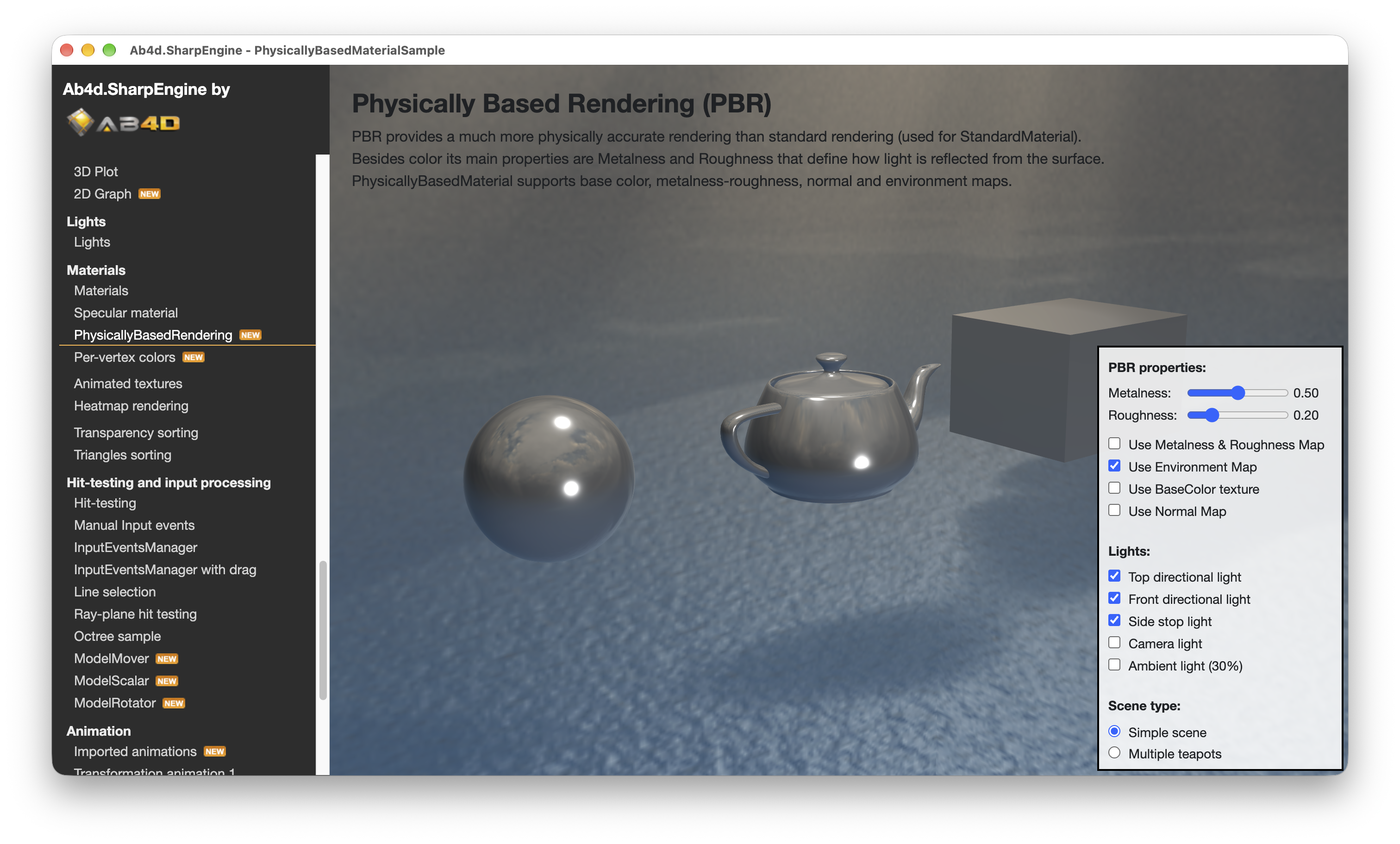
- Implemented rendering PhysicallyBasedMaterial (PBR), including support for environment mapping.
- Implemented rendering per-vertex colored models by using VertexColorMaterial or setting VertexColors data to a mesh.
- Added ModelMover, ModelRotator and ModelScalar that can be used to move, rotate and scale the selected 3D models.
- Added TwoDimensionalCamera that can be used to show 2D shapes and lines.
- Added MultiMaterialModelNode that can show one mesh with different materials. For example, it is used to show a skybox.
- Implemented importing keyframe and skeletal animations from glTF files.
One of my most beloved programming tasks is optimizing performance. And when I advise the customer on how to improve performance, in most cases the goal is to reduce the number of draw calls that are required to render the 3D scene.
Therefore, for me, the best new feature in this release is the new OptimizedGroupNode.
Here is a screenshot of the new OptimizedGroupNode sample:
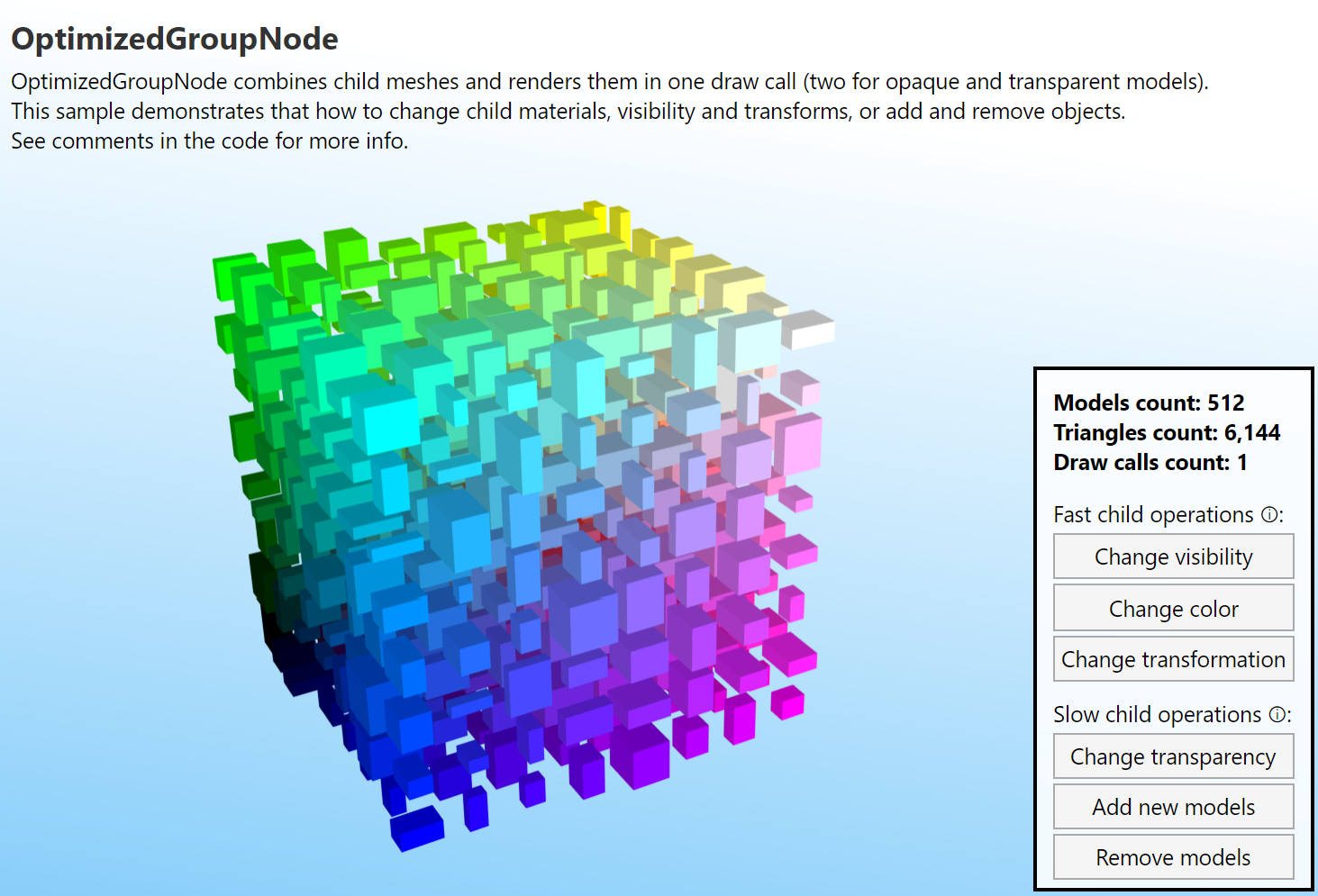
OptimizedGroupNode object in many ways acts just like a standard GroupNode object. You can add and remove child SceneNode objects to and from it. But behind the scenes, it works very differently. Instead of rendering each child SceneNode individually, it combines vertices from all child nodes and creates one giant vertex buffer and one index buffer. Then it stores all the transformations and material colors into an instance buffer. Finally, it creates a draw indirect buffer that specifies where to get the vertex and index data for each model. After that, all child nodes can be rendered with a single draw call (for opaque and transparent models, two draw calls are needed).
This provides huge performance gains. Many times the 3D scene consists of many simple 3D objects and when rendering them, the code in Ab4d.SharpEngine, the graphics driver and the graphics card need to create a lot of instructions on how to render the scene. In this case, the graphics card spends a lot of time waiting for those instructions. But if we give it all the data to render all the objects in one draw call, the graphics card can fully optimize all its threads and render the scene as fast as possible.
What is more, OptimizedGroupNode still allows updating the child objects. Here we need to distinguish between fast and slow update operations. Fast operations require just a simple change in a buffer and the 3D scene can be rendered again. Slower operations require regeneration of buffers and new recording of Vulkan draw commands (command buffers).
The following are fast child operations:
- Change material's color (change the DiffuseColor property) or change material object (assign a new StandardMaterial to ModelNode.Material property)
- Change visibility of a child ModelNode or GroupNode
- Change transformation of a child node
Slow child operations are:
- Change transparency of a material from opaque to transparent or vice versa (this will be improved in the future)
- Add or remove child nodes (including GroupNode objects)
This means that you can show a very complex 3D model with OptimizedGroupNode and are still be able to hide some of its parts or change the color of the selected model.
Of course, there are also some limitations of the OptimizedGroupNode:
- Only StandardMaterial without a texture and specular color is supported (SolidColorMaterial, VertexColorMaterial and PhysicallyBasedRenderingMaterials are not supported).
- Only the Material property is used (not BackMaterial). However, with the IsTwoSided property, it is possible to render all objects with a two-sided material.
- Only meshes of type StandardMesh and GeometryMesh are supported (PositionsMesh and TriangleMesh with other vertex layouts are not supported).
- Changing the mesh or individual positions or triangle indices of a child MeshModelNode is not supported.
- OptimizedGroupNode requires vkCmdDrawIndexedIndirect so it is supported only on Vulkan and not with WebGL.
Preparing all the buffers can take some time. Therefore, OptimizedGroupNode also provides the InitializeAsync method, which builds the data and GPU buffers on a background thread.
I am sure that OptimizedGroupNode will be used by many users. I am also sure it will be used by ALL users of the next new feature: Ab4d.SharpEngine.IfcLite library.
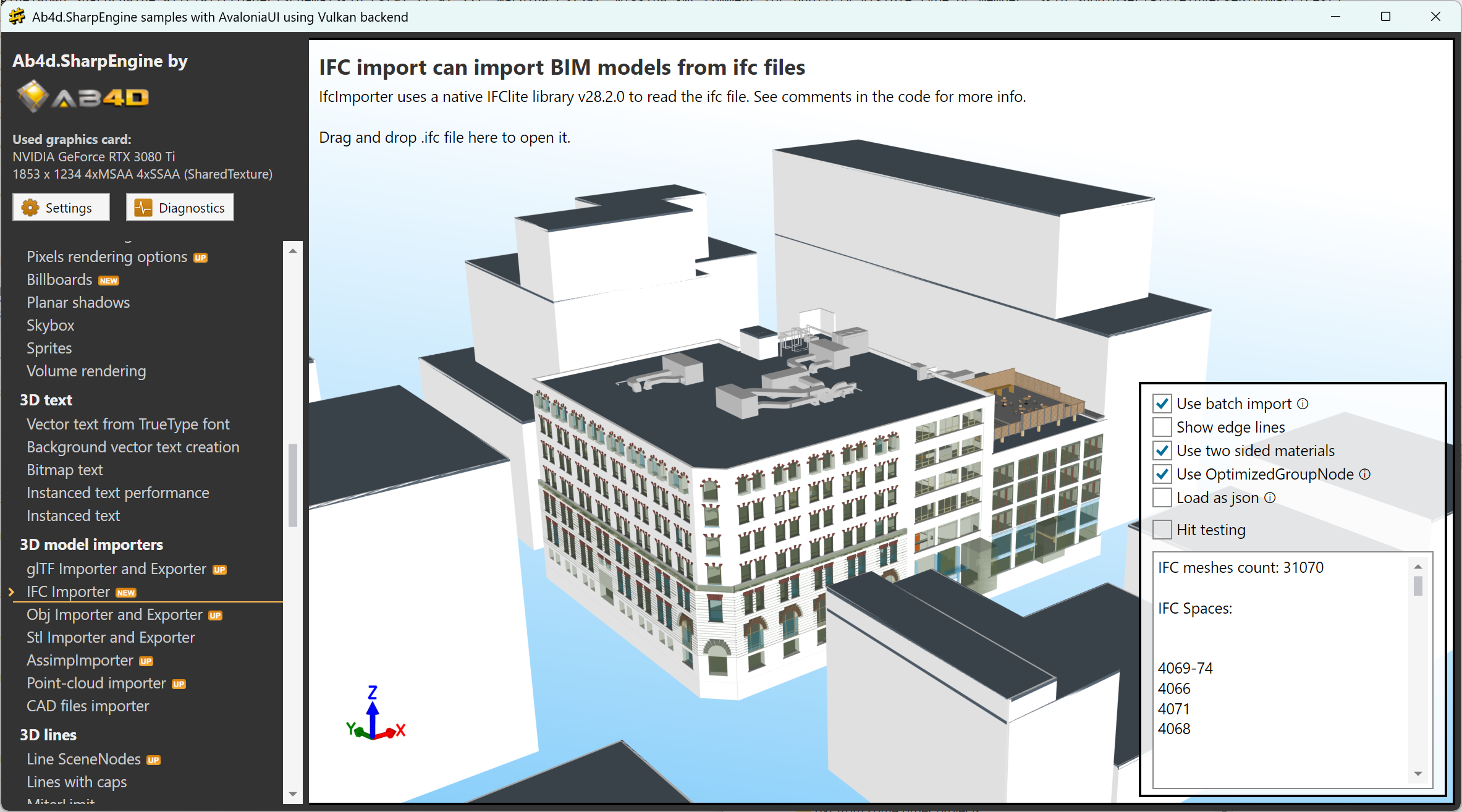
Ab4d.SharpEngine.IfcLite library can be used to import BIM (Building Information Modeling) models from IFC files. Those files are typically used to store huge architectural models that can consist of several thousand smaller building blocks. Rendering such models with the standard rendering model, where each scene node is rendered by its own draw call, can be slow. But the new OptimizedGroupNode can render the whole building with one draw call (or two when the building has semi-transparent materials).
The Ab4d.SharpEngine.IfcLite library uses an open-source native IFC-Lite library (https://github.com/LTplus-AG/ifc-lite). This library can import models from IFC files and produce a json text with all the meshes and model properties. But parsing the json can be slow. To solve that, I have forked the source (https://github.com/ab4d/ifc-lite) and added additional export functions that can be used from .Net app to get meshes (vertices, triangle indices) and other data directly from native memory without converting them to a string and then back.
The library also supports batch import. This means that 3D meshes are provided to the .Net application as they are loaded from the IFC file. For huge IFC files, this means that the user can see the progress of loading the file.
Here is a screenshot of the new sample:
The next major new feature was highly requested by customers who previously used Ab3d.PowerToys and Ab3d.DXEngine. This is the CameraNavigationCircles camera controller.
See the following video to see it in action:
CameraNavigationCircles shows the current camera orientation with 3D axes and axis circles. It can also be used to rotate the camera. This can be done by dragging the mouse or pointer over the CameraNavigationCircles. The user can also click an axis circle to rotate the camera to that axis. By holding down the control key (which can be changed in the PreserveAttitude property) and clicking an axis circle, the user rotates to that axis without changing the camera's attitude (vertical direction).
The following screenshot from the new sample shows many settings for the CameraNavigationCircles:
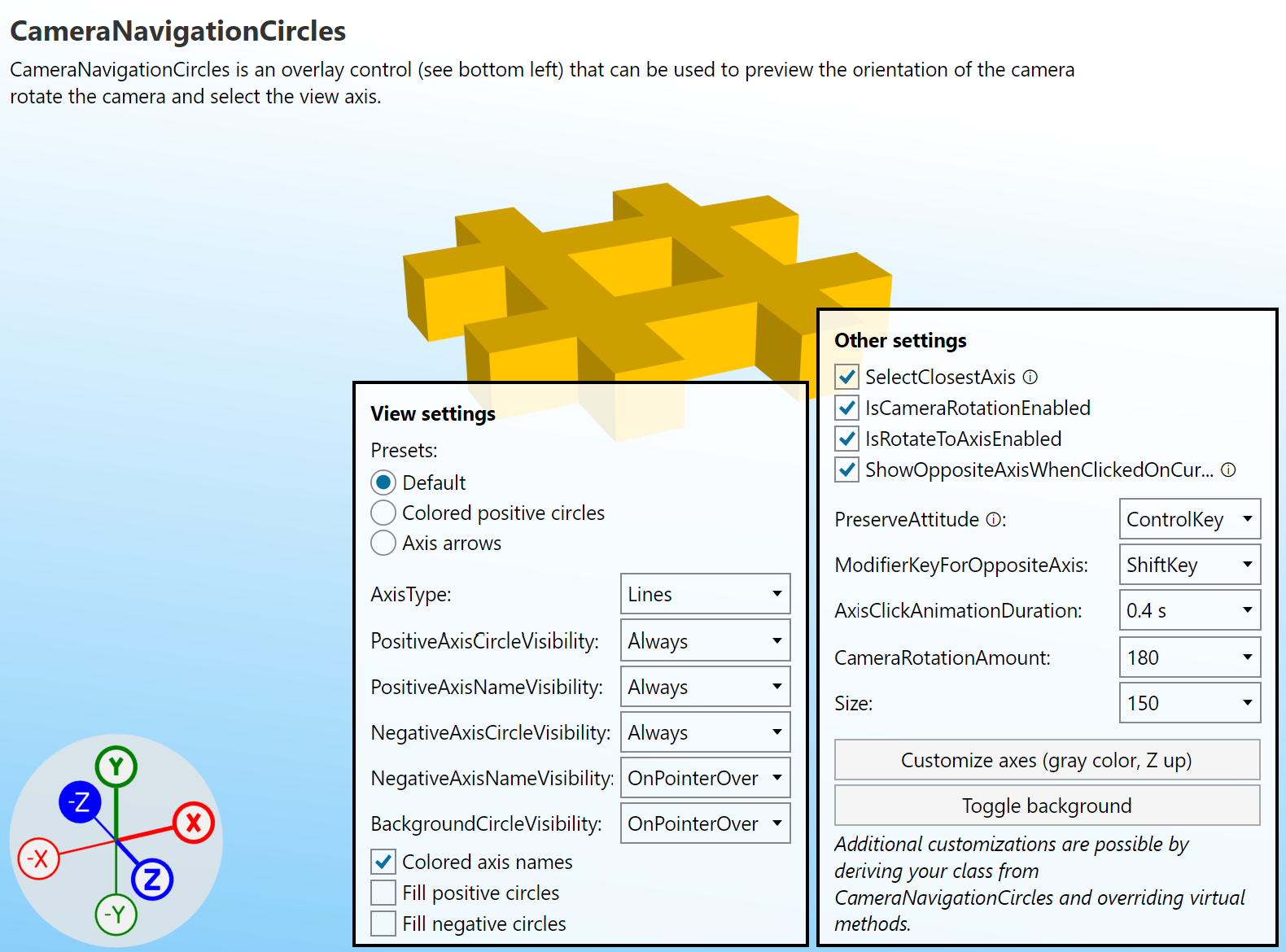
CameraNavigationCircles class is derived from a new OverlayPanelBase class. This class can be used to show a 3D scene with a different camera and 3D objects on top of the main 3D scene. Rendering the overlay 3D scene can be done by rendering the scene to a texture and showing that texture by using sprites. This mechanism was also used by CameraAxisPanel in the previous version.
But the problem with using sprites is that before the sprite can be shown, the engine needs to wait until the overlay scene is rendered. This synchronization adds significant delay to rendering, especially for overlays that change a lot - like the CameraAxisPanel that changes on each camera change.
The new OverlayPanelBase class can solve that by providing another way to render the overlay: objects from the overlay scene are simply rendered at the end of rendering objects from the main scene. So after the user changes the camera, all that is required to render the next frame is to update two small scene buffers (they define the camera matrices and scene view size; one scene buffer is required for the main scene and one for the overlay scene). After that, the previously recorded command buffer can be executed again.
The new CameraNavigationCircles also uses that rendering mode so that it can be rendered very fast.
Note that CameraAxisPanel and CameraNavigationCircles are not yet available to WebGL. I am planning to add support for that in the next version.
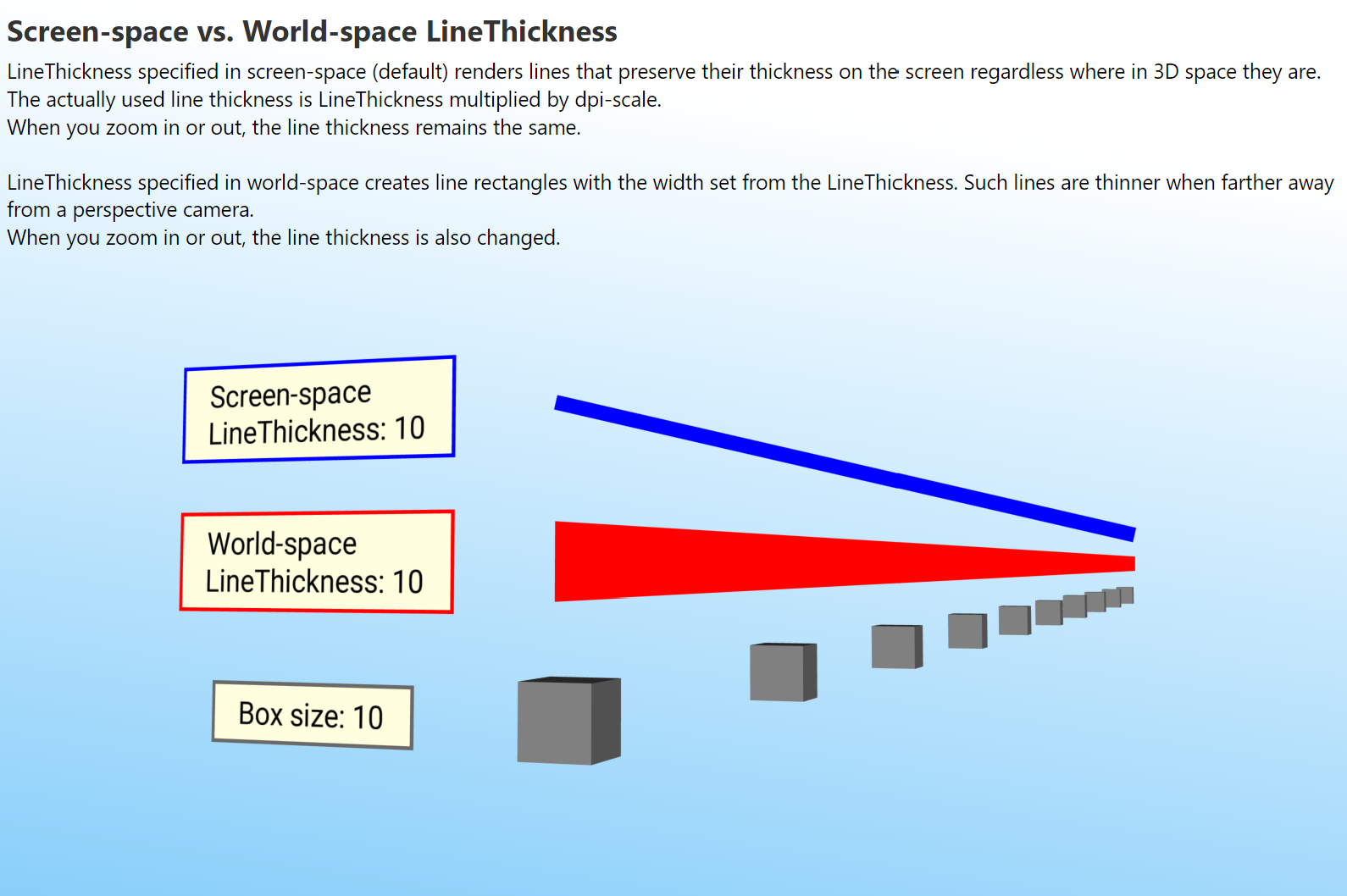
The next big new feature is support for world-size line thickness and pixel size. In the previous version, the LineThickness value was specified in screen-size coordinates. This means that a line with thickness 1 produces 1-pixel-wide lines (when no dpi-scale is used). Because 3D lines are usually not actual 3D objects that have volume, real mass and are part of the 3D scene, screen-space line thickness is usually desired.
But sometimes, users want to scale the lines with the 3D objects. For example, when showing edge lines on a large 3D object, screen-space thick lines are clearly visible when the object is close to the camera. But if the user zooms out a lot, all that remains of the 3D object are edge lines because they don't scale with distance. To solve that, all the lines now support IsLineThicknessInWorldSpace property. It is set to false by default, but when set to true, the LineThickness value is specified in world-space coordinates. The following screenshot shows a sample that demonstrates this:
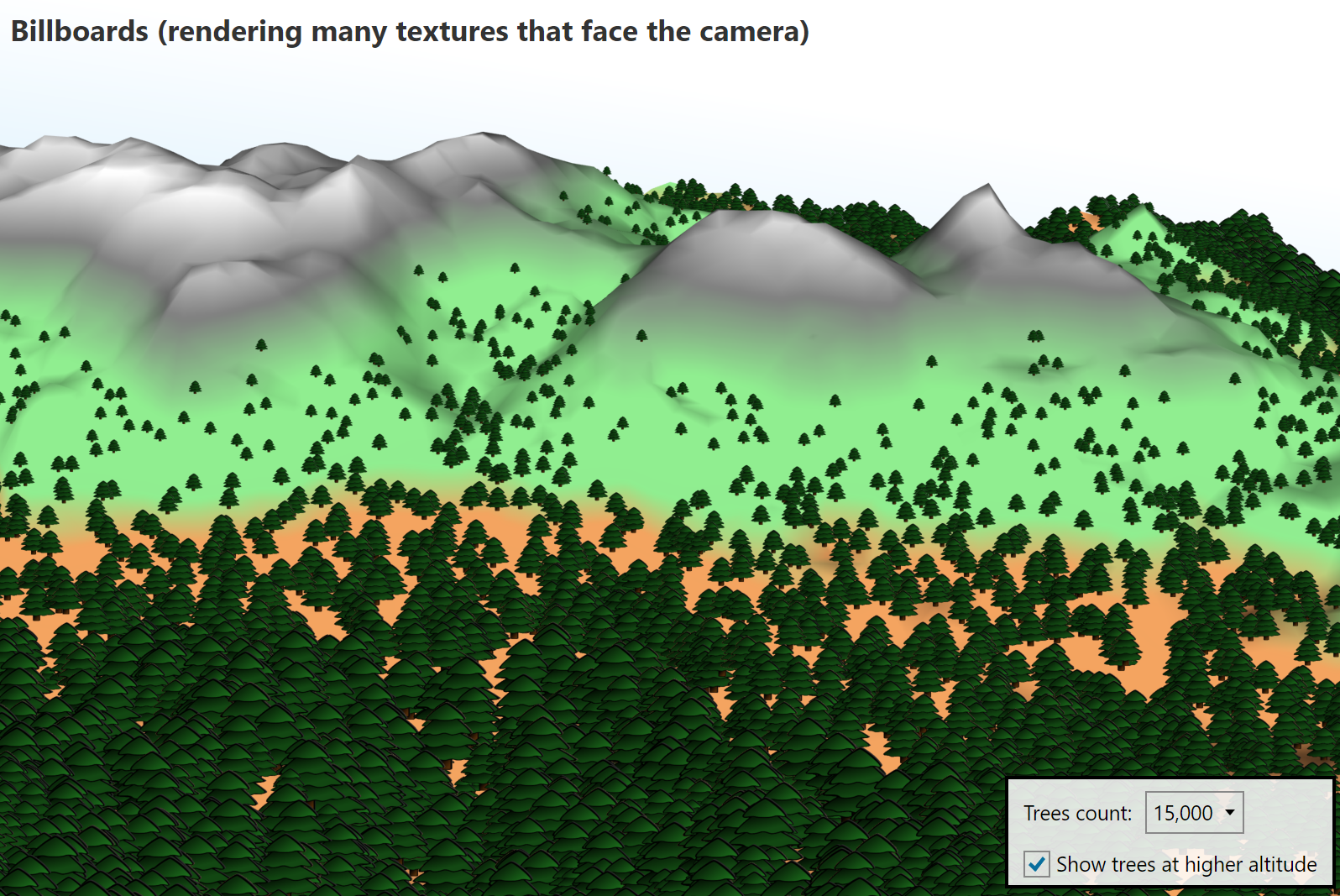
World-space size is now also supported for rendering pixels by the new IsWorldSize property. This can also be used to render billboards (2D textures that are always facing the camera) in world space, for example:
As described at the beginning, Ab4d.SharpEngine.WebGL library also got many new features that were missing compared to the Vulkan library.
I am especially happy that I found a solution for hardware-accelerated 3D lines. Because WebGL does not support geometry shaders, I was not able to use the code from the Vulkan library. Instead, I need to use instancing, where a simple quad mesh is transformed in a vertex shader to form a line that is specified by the start and end positions. This works very fast and can also render line patterns and supports both screen-space and world-space line thickness.
But rendering connected lines (PolyLineNode) with mitered and beveled joints and rendering line caps (arrows and other shapes) are still not supported. I will try to add support for that in the next version.
On the other hand, in the next version I will try to reuse the instancing algorithm from WebGL and use it in the Vulkan engine as another option to render lines. This will be very beneficial for using Ab4d.SharpEngine on macOS and iOS because there geometry shader is also not supported. So, using instancing can provide proper thick-line support for those systems (now you need to use a specially compiled MoltenVK library to add partial support for thick lines).
With other new features, the list of missing features in the WebGL version of the library is now very short - see Ab4d.SharpEngine.WebGL implementation details.
And here is a screenshot of an Electron app showing PBR sample running on macOS:
There are also many other improvements and fixes. You can see a list of all the changes at SharpEngine Change log.
Now I am planning to prepare a new version of Ab3d.PowerToys and Ab3d.DXEngine libraries.
Also, because many software development tasks are done by AI agents, I will prepare Skills to help agents better understand SharpEngine objects and troubleshoot issues. I am also planning to provide an MCP server that will allow agents to get 3D scene information and rendered screenshots from the running application.