I am really happy to inform you that a major new version of Ab4d.SharpEngine is now available.
The main new feature of this release is support for browsers and browser-based apps, such as Electron. Before I describe that in more detail, let me list some other great new features:
- added support for PhysicallyBasedRendering (PBR) materials,
- added camera rotation, movement and zoom smoothing,
- added highly customizable 3D graph axes,
- added hardware accelerated rendering of two-sided materials,
- added support for super-fast hit testing of pixels and point clouds,
- added support for frustum culling,
- improved slicer and generation of curve lines,
- added option to force starting the Avalonia with Vulkan backend app on a dedicated GPU.
And there are many more new features and fixes. See the release description on GitHub for a complete list of changes.
To jump start into the capabilities of the new 3D rendering engine for the web, check the online working demo.
If you are following the development at AB4D, then you were already expecting the release of the 3D render for the browser. But you may be expecting the release a few weeks earlier and with version number 1.0. But when trying to create the samples that would be shared with the WebGL and Vulkan versions of the engine, I realized it would be much better to release both libraries at the same time. So, now both Ab4d.SharpEngine (for Vulkan) and Ab4d.SharpEngine.WebGL use the same version 4.0.
Also, you may have noticed that I have renamed the Ab4d.SharpEngine.Web into Ab4d.SharpEngine.WebGL (Web → WebGL). This now better represents the rendering technology and leaves room for an optional WebGPU version in the future. I was also thinking about renaming the Ab4d.SharpEngine into Ab4d.SharpEngine.Vulkan, but have decided not to do that to avoid disruption to NuGet package naming. However, in the future, I will try to preserve all the common and shared classes in the Ab4d.SharpEngine library and create a specialized Ab4d.SharpEngine.Vulkan library that would contain only the API-specific code. But I have to find a good way to preserve performance without using many virtual functions.
This also meant that I had to postpone the release of Ab4d.SharpEngine.WebGL and speed up the release of Ab4d.SharpEngine (postponing implementation of 3D shadows).
Anyway, the joined release cycle now allows having shared samples projects that are now all in the GitHub Samples repo that now have 18 different solutions (.sln files)!
Many samples can share 100% of the source code from the Ab4d.SharpEngine.Samples.Common project. But because not all the features are supported in WebGL, some samples need to exclude parts of the code by using "#if VULKAN" precompiler directive. The following article describes How to share the code for desktop, mobile and browser platforms.
As seen in the Ab4d.SharpEngine.WebGL implementation details most of the features are already supported in WebGL library. In my opinion, the most important feature that is currently missing is support for thick lines and line caps (arrows). The reason for that is that WebGL does not support the geometry shader or LineThickness property. There is no good way to implement that. In the future, there will probably be an option to support thick lines by generating line meshes on the CPU. This is much slower and requires the mesh to be regenerated on each camera change. Another option that is already available is to use TubeLines (Lines-TubeLinesSample). But with TubeLines the line thickness is defined in the world coordinate system and not in the screen coordinate system (if LineNode.LineThickness is set to 2, then the line will always be 2 pixels wide multiplied by DpiScale regardless of where in the 3D world it is).
Please note that when checking the performance of WebAssembly, the Debug and also the Release builds of WebAssembly are significantly slower than the Published / Deployed build. So always check the performance of the published code. You can also check the performance with the online working demo.
The rendering engine comes with many samples. The main sample is Blazor WebAssembly that uses a shared common project to demonstrate the main features of the engine. There are also samples that show how to include the published wasm project in any web page served by an ASP.NET Core web server, a Node.js Express server, or a Python socket server. Each project also has its readme.md file that provides additional details.
Another very interesting sample shows how to use Ab4d.SharpEngine.WebGL in an Electron app. Electron is one of the most popular frameworks for creating desktop applications that run on Windows, Linux and macOS. It is used by many applications, including Visual Studio Code, Slack, Discord, GitHub Desktop, and many others.
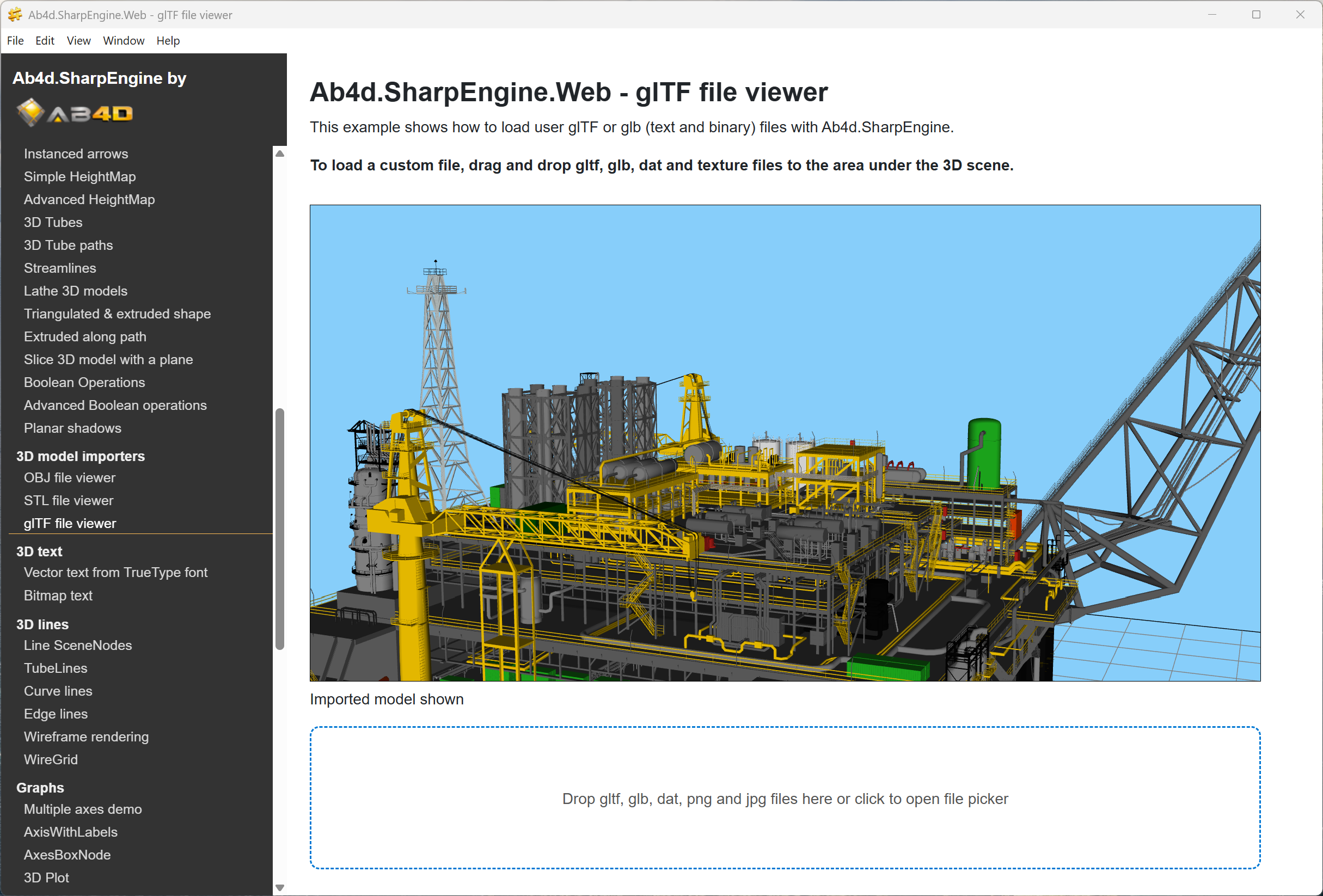
For example, the following screenshot shows an Electron app that shows a complex oil rig 3D model that was imported from a dragged and dropped file:
Now let me describe some additional new features of version 4.0.
Rendering of PhysicallyBasedRendering (PBR) materials was added to the Vulkan part of the rendering engine (not yet for the WebGL). It provides a top-quality rendering system that accurately calculates how light bounces from different materials. Those light properties are defined by metalness and roughness values. The following screenshot shows how those two values change the outlook of the model:
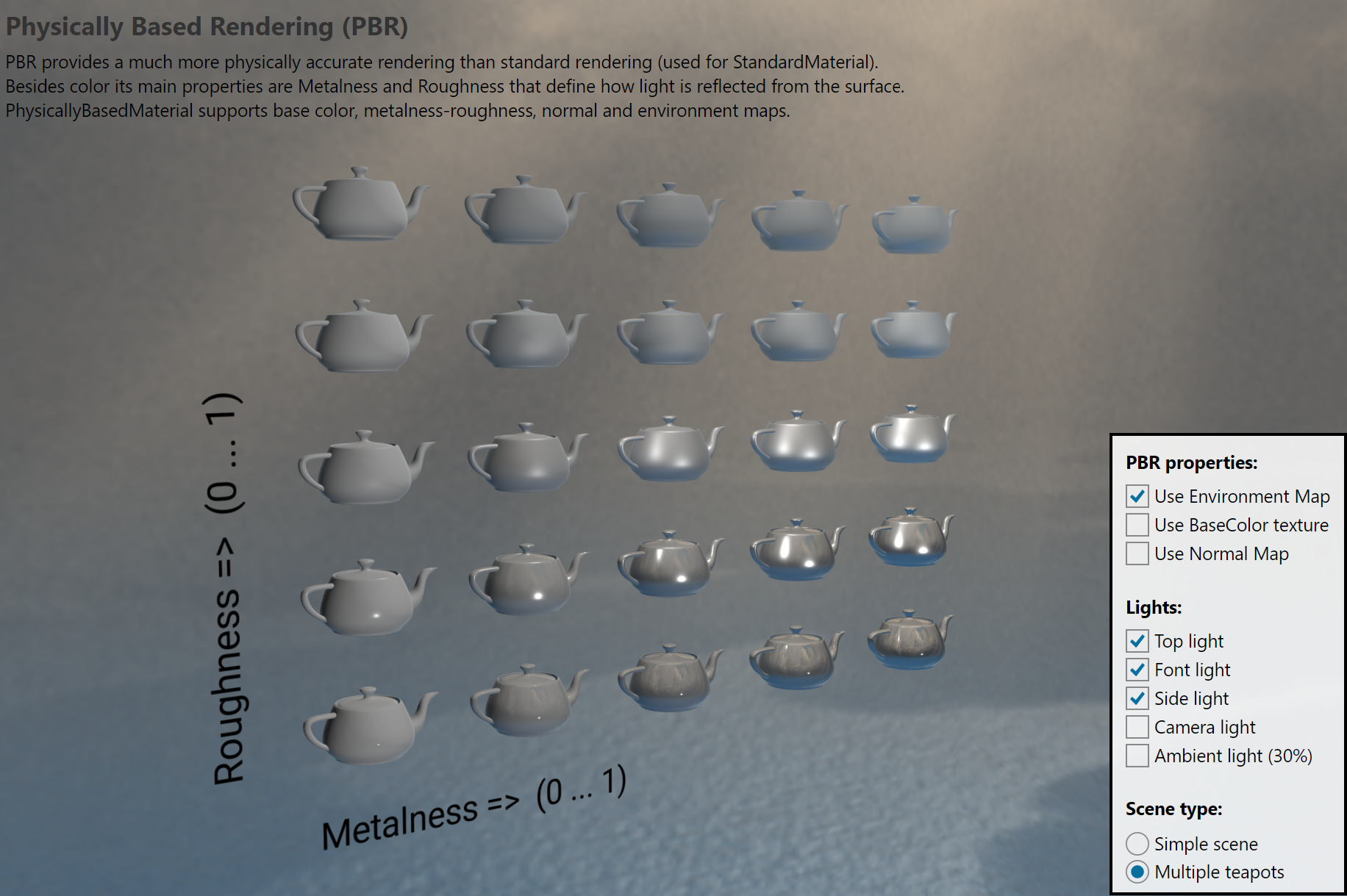
Because different parts of the model can have different materials, the models usually come with a texture that defines metalness and roughness values for each part of the model. To simulate bumpiness, the PBR also supports normal maps. And what is more, the PBR shaders in the Ab4d.SharpEngine can also render environment maps that show the reflections of the environment on the models (this can be seen in the previous screenshot on models with low roughness and high metalness).
The following screenshot shows a complex model rendered with PBR shader:
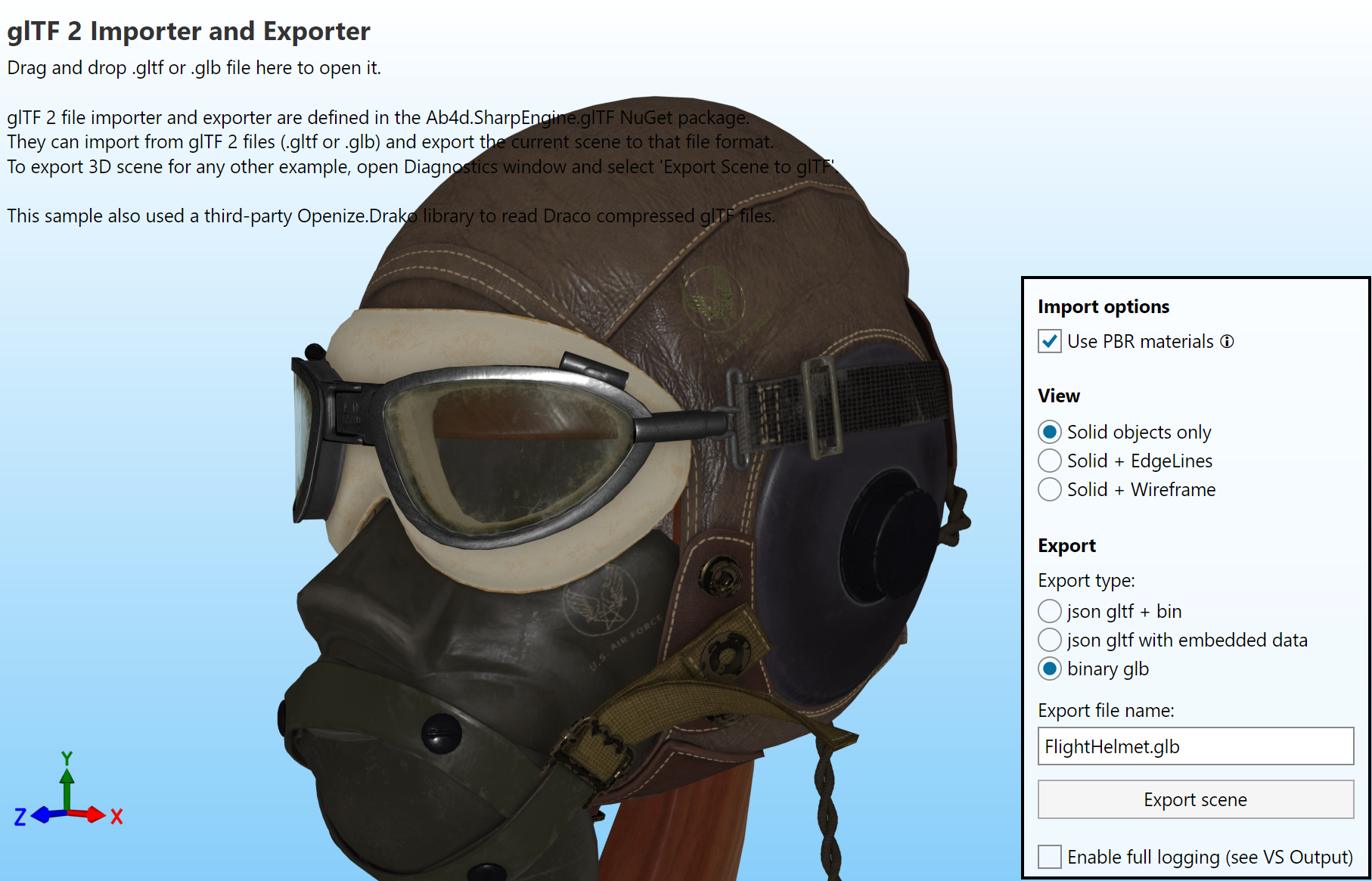
PBR materials are also used by default in the glTF files. Therefore, the glTFImporter was updated to support loading PBR textures (maps). But to preserve the backward compatibility, you need to enable that by setting the new UsePbrMaterial property to true. When it is set to false, the glTFImporter will create StandardMaterials instead of PhysicallyBasedMaterials.
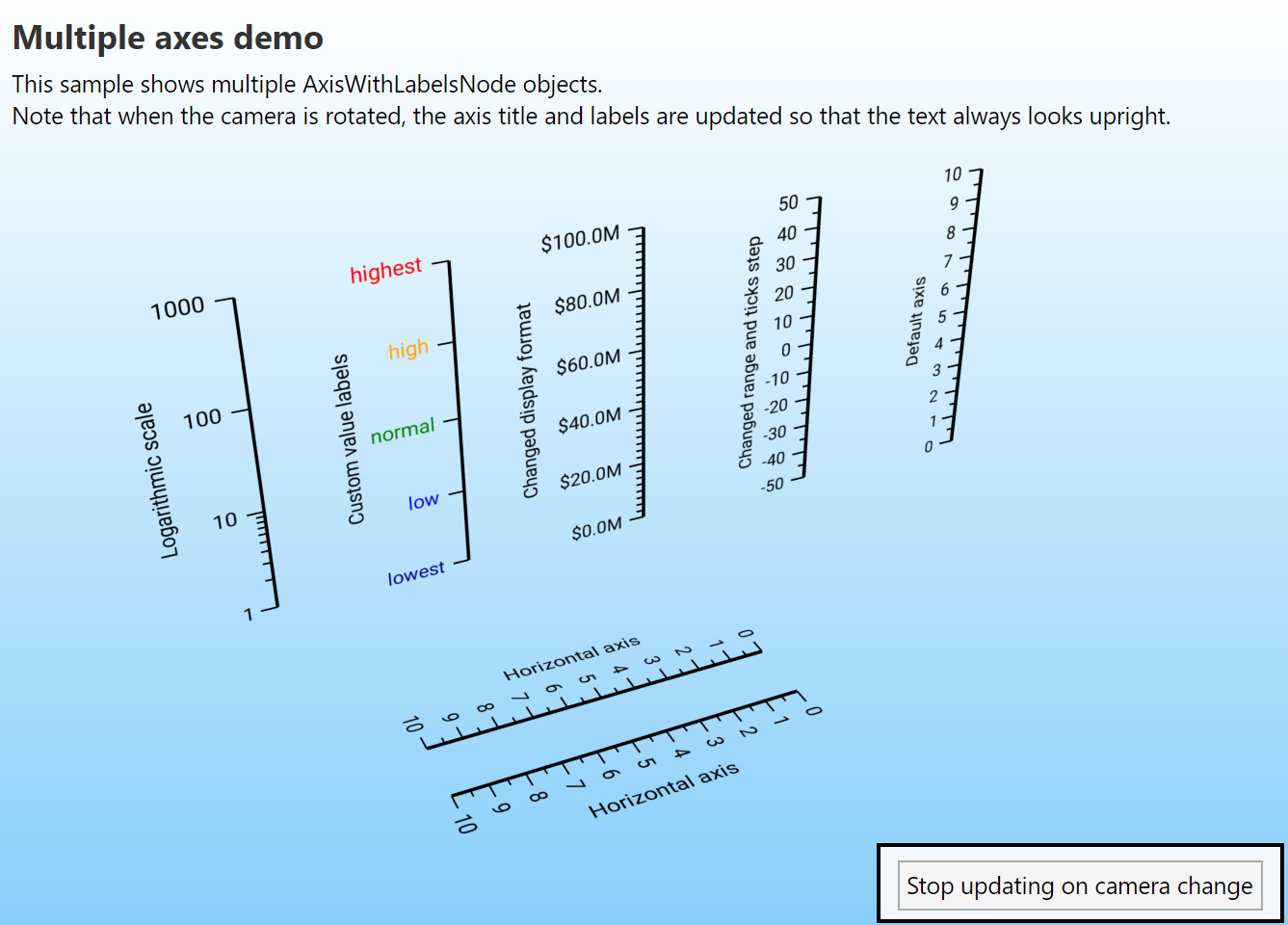
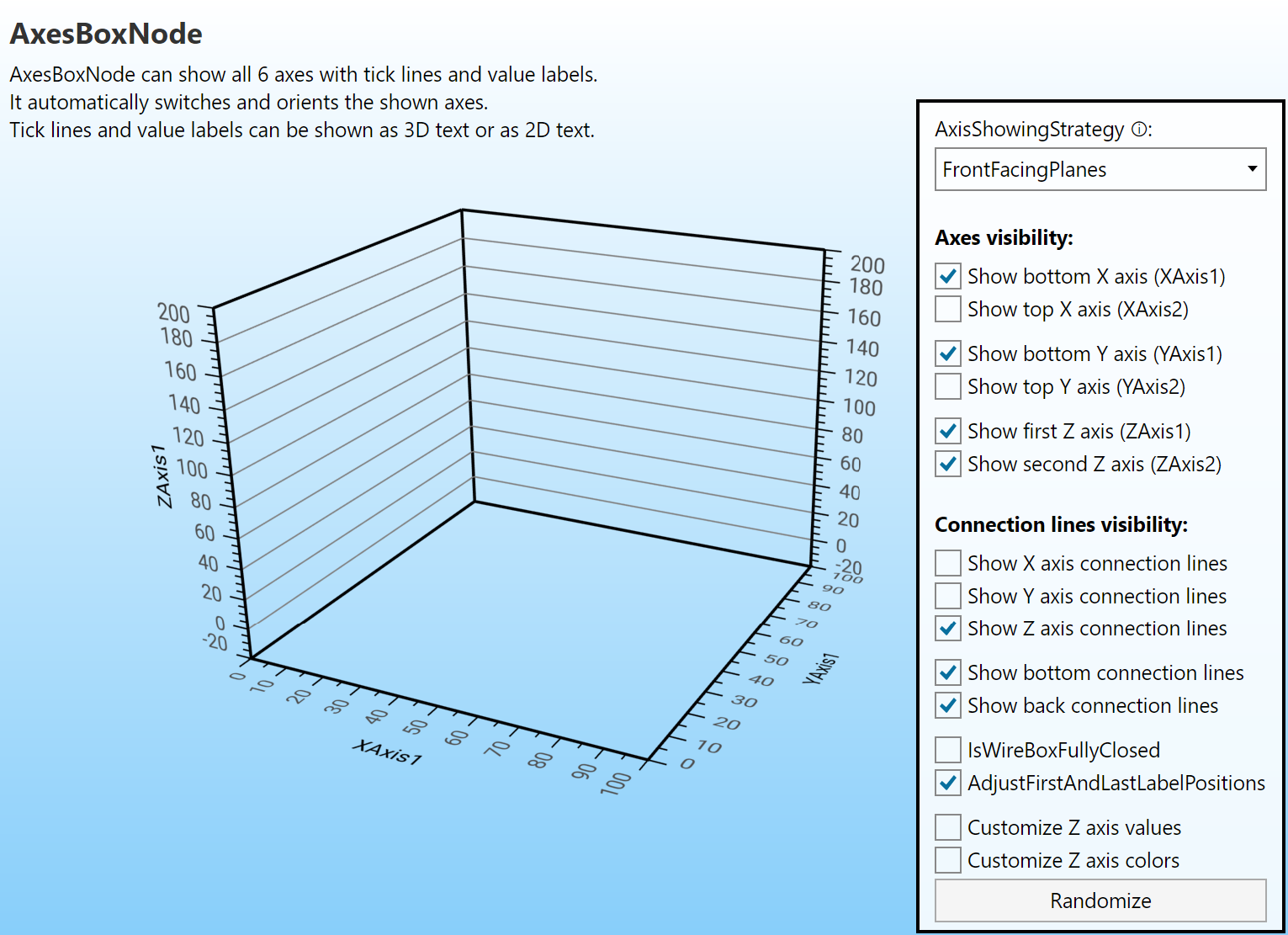
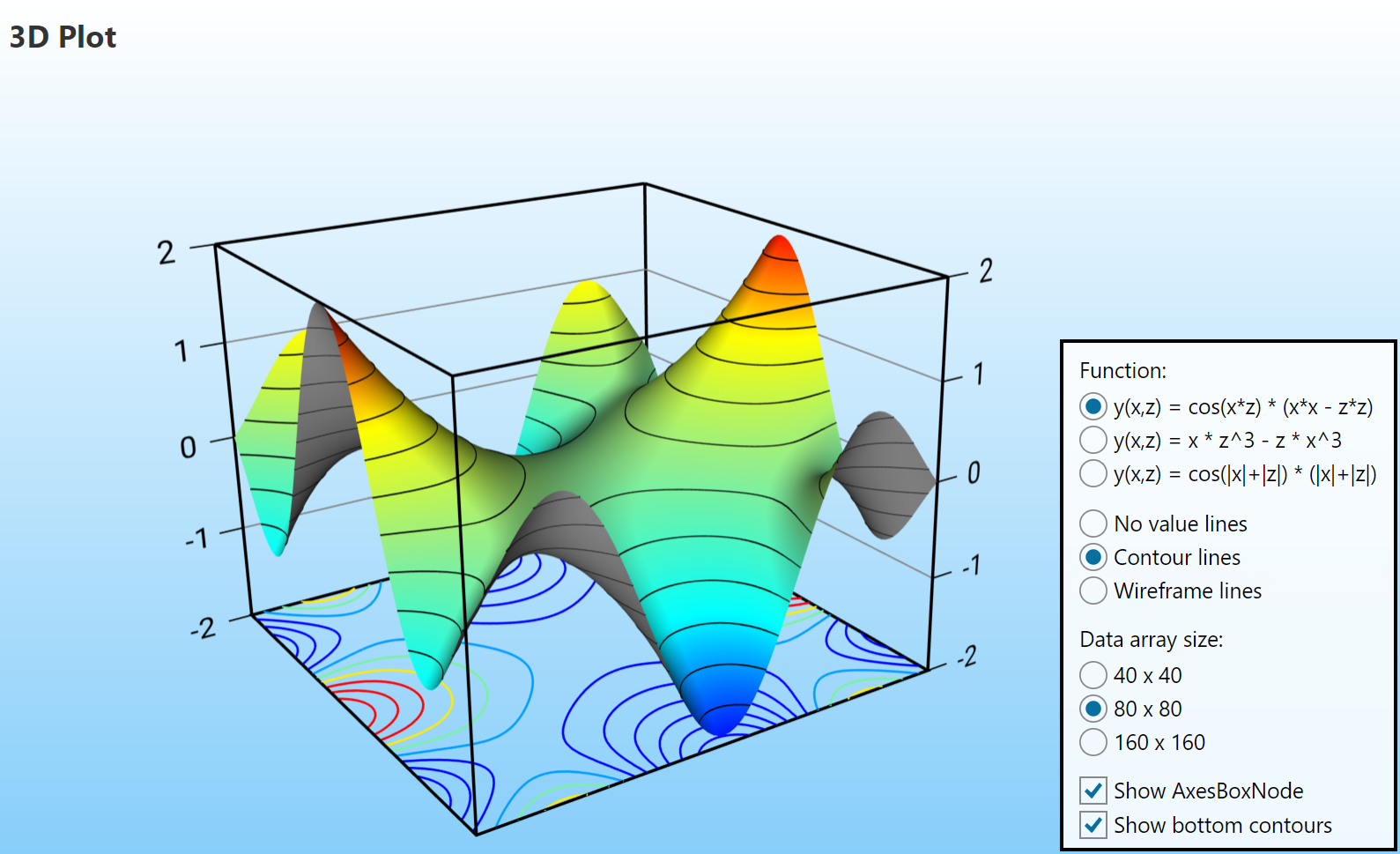
Those who are using Ab4d.SharpEngine for rendering 3D data in a graph will be happy to know that the new version of the engine includes the AxisWithLabelsNode and AxisBoxNode objects, which can display highly customizable axes. The AxisBoxNode can also dynamically show or hide the axes based on the camera angle. The following screenshots show some of the new capabilities:
Then there are a few new features that were ported from the last version of Ab3d.PowerToys. In my opinion, the most important of those features is camera smoothing. Now it is possible to smooth the camera's rotation, movement and zooming. This makes the camera change in a much more natural way - the camera does not just “jump” to the new position, but it uses easing animation to change orientation or move. Because the camera is the main interface between your application and the user, camera smoothing can significantly improve the user experience.
Another two new features that were ported from Ab3d.PowerToys include improved slicing support and improved curve line generation. The new Slicer class improves slicing performance and also allows generating filled sliced meshes and slice polygon lines. In the new version, the curve lines can now be generated by using an adaptive algorithm that adds more points where the curvature is higher. This requires significantly fewer curve line positions than when using a fixed number of positions per segment. See the following blog post for more details about that. Also, those three features are all available for Vulkan and WebGL versions of Ab4d.SharpEngine.
Lastly, I would like to describe three new features that can significantly improve the performance in some cases. The first is added support for rendering two-sided materials with one draw call. Many times we want to render the front and the back side of the model with the same material. Before, this required two draw calls. But now the StandardMaterial with the IsTwoSided property set to true can be rendered with a single draw call. So, if all the objects in the scene are rendered with two-sided materials, this improves the rendering performance by 100% (halves the number of draw calls and fragment shader invocations).
Often, we render a 3D scene with many objects behind the camera. In those cases, we can significantly improve performance by issuing draw calls only for visible objects. This is not possible with the new BoundingFrustum struct, which can be used for frustum culling (checking whether an object's bounding box is currently visible to the current camera).
On laptops with multiple GPUs, Windows starts all apps by default with the integrated GPU. A recommended way to solve that is for the user to manually set the app to use High Performance option in the Graphics Settings. But now it is possible to force using a dedicated GPU. But when you use Avalonia with Vulkan backend apps, then the new version adds an option to force using a dedicated GPU. See Instructions on how to do that in a new Ab4d.SharpEngine Performance Tips.
I am very passionate about improving the performance of the engine. If you would like me to check how to improve your app's performance, please contact me, and we will arrange an online meeting with screen sharing where I will try to find ways to improve your app.
Most of the communication between the users of Ab4d.SharpEngine and me are done by email. Some users also used the forum. But recently, sending emails from the forum has become very unreliable; I may not receive an email about a new forum post, or the user may not get a notification about my reply. Therefore, I have decided to make the forum read-only. This way, all the existing answers remain available. But for new questions, please use the Issues or Discussions on the GitHub repo for Ab4d.SharpEngine.Samples .
And as usual, to conclude, I would like to quickly present my future plans.
The first thing I will work on is proper support for shadows. Currently, the only option is to use planar shadows. Recently, I found an algorithm that produces really nice soft shadows. I am really excited about that because I am sure that the results will be awesome. Also, I would like to add support for showing CameraNavigationCircles (as in Ab3d.PowerToys). And I have some plans to improve rendering performance for very complex BIM models. Also, I would like to improve the performance of Volume rendering.
And since everyone is now talking about AI agents, I plan to provide Skills files with instructions on how to use Ab4d.SharpEngine. This way, the agents will be able to write c# code that will generate and update the 3D scene. Maybe there could also be an MCP server that generates rendered bitmaps of the 3D scene and provides the AI with scene, camera and other object information while the app is running. Working with Ab4d.SharpEngine is already quite easy, but with better AI support, this will be even easier.