New Ab4d.SharpEngine with many great new features and the first version for the browser published

by abenedik 2. April 2026 09:56

I am really happy to inform you that a major new version of Ab4d.SharpEngine is now available.

The main new feature of this release is support for browsers and browser-based apps, such as Electron. Before I describe that in more detail, let me list some other great new features:

  • added support for PhysicallyBasedRendering (PBR) materials,
  • added camera rotation, movement and zoom smoothing,
  • added highly customizable 3D graph axes,
  • added hardware accelerated rendering of two-sided materials,
  • added support for super-fast hit testing of pixels and point clouds,
  • added support for frustum culling,
  • improved slicer and generation of curve lines,
  • added option to force starting the Avalonia with Vulkan backend app on a dedicated GPU.

And there are many more new features and fixes. See the release description on GitHub for a complete list of changes.


To jump start into the capabilities of the new 3D rendering engine for the web, check the online working demo.

If you are following the development at AB4D, then you were already expecting the release of the 3D render for the browser. But you may be expecting the release a few weeks earlier and with version number 1.0. But when trying to create the samples that would be shared with the WebGL and Vulkan versions of the engine, I realized it would be much better to release both libraries at the same time. So, now both Ab4d.SharpEngine (for Vulkan) and Ab4d.SharpEngine.WebGL use the same version 4.0. 

Also, you may have noticed that I have renamed the Ab4d.SharpEngine.Web into Ab4d.SharpEngine.WebGL (Web → WebGL). This now better represents the rendering technology and leaves room for an optional WebGPU version in the future. I was also thinking about renaming the Ab4d.SharpEngine into Ab4d.SharpEngine.Vulkan, but have decided not to do that to avoid disruption to NuGet package naming. However, in the future, I will try to preserve all the common and shared classes in the Ab4d.SharpEngine library and create a specialized Ab4d.SharpEngine.Vulkan library that would contain only the API-specific code. But I have to find a good way to preserve performance without using many virtual functions.

This also meant that I had to postpone the release of Ab4d.SharpEngine.WebGL and speed up the release of Ab4d.SharpEngine (postponing implementation of 3D shadows).

Anyway, the joined release cycle now allows having shared samples projects that are now all in the GitHub Samples repo that now have 18 different solutions (.sln files)!

Many samples can share 100% of the source code from the Ab4d.SharpEngine.Samples.Common project. But because not all the features are supported in WebGL, some samples need to exclude parts of the code by using "#if VULKAN" precompiler directive. The following article describes How to share the code for desktop, mobile and browser platforms.

As seen in the Ab4d.SharpEngine.WebGL implementation details most of the features are already supported in WebGL library. In my opinion, the most important feature that is currently missing is support for thick lines and line caps (arrows). The reason for that is that WebGL does not support the geometry shader or LineThickness property. There is no good way to implement that. In the future, there will probably be an option to support thick lines by generating line meshes on the CPU. This is much slower and requires the mesh to be regenerated on each camera change. Another option that is already available is to use TubeLines (Lines-TubeLinesSample). But with TubeLines the line thickness is defined in the world coordinate system and not in the screen coordinate system (if LineNode.LineThickness is set to 2, then the line will always be 2 pixels wide multiplied by DpiScale regardless of where in the 3D world it is).

Please note that when checking the performance of WebAssembly, the Debug and also the Release builds of WebAssembly are significantly slower than the Published / Deployed build. So always check the performance of the published code. You can also check the performance with the online working demo.

The rendering engine comes with many samples. The main sample is Blazor WebAssembly that uses a shared common project to demonstrate the main features of the engine. There are also samples that show how to include the published wasm project in any web page served by an ASP.NET Core web server, a Node.js Express server, or a Python socket server. Each project also has its readme.md file that provides additional details.

Another very interesting sample shows how to use Ab4d.SharpEngine.WebGL in an Electron app. Electron is one of the most popular frameworks for creating desktop applications that run on Windows, Linux and macOS. It is used by many applications, including Visual Studio Code, Slack, Discord, GitHub Desktop, and many others.

For example, the following screenshot shows an Electron app that shows a complex oil rig 3D model that was imported from a dragged and dropped file:

Complex oil rig model in Electron app with Ab4d.SharpEngine


Now let me describe some additional new features of version 4.0.

Rendering of PhysicallyBasedRendering (PBR) materials was added to the Vulkan part of the rendering engine (not yet for the WebGL). It provides a top-quality rendering system that accurately calculates how light bounces from different materials. Those light properties are defined by metalness and roughness values. The following screenshot shows how those two values change the outlook of the model:

PBR materials with different metalness and roughness

Because different parts of the model can have different materials, the models usually come with a texture that defines metalness and roughness values for each part of the model. To simulate bumpiness, the PBR also supports normal maps. And what is more, the PBR shaders in the Ab4d.SharpEngine can also render environment maps that show the reflections of the environment on the models (this can be seen in the previous screenshot on models with low roughness and high metalness).

The following screenshot shows a complex model rendered with PBR shader:

Flight helmet PBR model with Ab4d.SharpEngine

PBR materials are also used by default in the glTF files. Therefore, the glTFImporter was updated to support loading PBR textures (maps). But to preserve the backward compatibility, you need to enable that by setting the new UsePbrMaterial property to true. When it is set to false, the glTFImporter will create StandardMaterials instead of PhysicallyBasedMaterials.


Those who are using Ab4d.SharpEngine for rendering 3D data in a graph will be happy to know that the new version of the engine includes the AxisWithLabelsNode and AxisBoxNode objects, which can display highly customizable axes. The AxisBoxNode can also dynamically show or hide the axes based on the camera angle. The following screenshots show some of the new capabilities:

Multiple 3D axes

AxesBoxNode with dynamically showing 3D axes based on camera angle

3D plot with contour lines


Then there are a few new features that were ported from the last version of Ab3d.PowerToys. In my opinion, the most important of those features is camera smoothing. Now it is possible to smooth the camera's rotation, movement and zooming. This makes the camera change in a much more natural way - the camera does not just “jump” to the new position, but it uses easing animation to change orientation or move. Because the camera is the main interface between your application and the user, camera smoothing can significantly improve the user experience.


Another two new features that were ported from Ab3d.PowerToys include improved slicing support and improved curve line generation. The new Slicer class improves slicing performance and also allows generating filled sliced meshes and slice polygon lines. In the new version, the curve lines can now be generated by using an adaptive algorithm that adds more points where the curvature is higher. This requires significantly fewer curve line positions than when using a fixed number of positions per segment. See the following blog post for more details about that. Also, those three features are all available for Vulkan and WebGL versions of Ab4d.SharpEngine.


Lastly, I would like to describe three new features that can significantly improve the performance in some cases. The first is added support for rendering two-sided materials with one draw call. Many times we want to render the front and the back side of the model with the same material. Before, this required two draw calls. But now the StandardMaterial with the IsTwoSided property set to true can be rendered with a single draw call. So, if all the objects in the scene are rendered with two-sided materials, this improves the rendering performance by 100% (halves the number of draw calls and fragment shader invocations).

Often, we render a 3D scene with many objects behind the camera. In those cases, we can significantly improve performance by issuing draw calls only for visible objects. This is not possible with the new BoundingFrustum struct, which can be used for frustum culling (checking whether an object's bounding box is currently visible to the current camera).

On laptops with multiple GPUs, Windows starts all apps by default with the integrated GPU. A recommended way to solve that is for the user to manually set the app to use High Performance option in the Graphics Settings. But now it is possible to force using a dedicated GPU. But when you use Avalonia with Vulkan backend apps, then the new version adds an option to force using a dedicated GPU. See Instructions on how to do that in a new Ab4d.SharpEngine Performance Tips.

I am very passionate about improving the performance of the engine. If you would like me to check how to improve your app's performance, please contact me, and we will arrange an online meeting with screen sharing where I will try to find ways to improve your app.


Most of the communication between the users of Ab4d.SharpEngine and me are done by email. Some users also used the forum. But recently, sending emails from the forum has become very unreliable; I may not receive an email about a new forum post, or the user may not get a notification about my reply. Therefore, I have decided to make the forum read-only. This way, all the existing answers remain available. But for new questions, please use the Issues or Discussions on the GitHub repo for Ab4d.SharpEngine.Samples .


And as usual, to conclude, I would like to quickly present my future plans.

The first thing I will work on is proper support for shadows. Currently, the only option is to use planar shadows. Recently, I found an algorithm that produces really nice soft shadows. I am really excited about that because I am sure that the results will be awesome. Also, I would like to add support for showing CameraNavigationCircles (as in Ab3d.PowerToys). And I have some plans to improve rendering performance for very complex BIM models. Also, I would like to improve the performance of Volume rendering.

And since everyone is now talking about AI agents, I plan to provide Skills files with instructions on how to use Ab4d.SharpEngine. This way, the agents will be able to write c# code that will generate and update the 3D scene. Maybe there could also be an MCP server that generates rendered bitmaps of the 3D scene and provides the AI with scene, camera and other object information while the app is running. Working with Ab4d.SharpEngine is already quite easy, but with better AI support, this will be even easier.

Ab4d.sharpEngine for the browser RC1 published

by abenedik 15. February 2026 19:17
I am really excited to inform you that the release candidate version of the Ab4d.SharpEngine has been published.
This brings many great and easy-to-use 3D graphics tools to the browser. But what excites me the most is how fast the native (WebAssembly) 3D rendering engine runs.
See the following screenshot:
You can also check the video here.
Or check it live in the browser.
Notice the performance figures in the lower right corner:
  • It takes only 0.68 ms to calculate the directions for 40.000 arrows (for each arrow, a 4x4 transformation matrix is calculated that points the arrow towards the animated yellow sphere; this time also includes the time to upload the matrices to the GPU)
  • It takes less than 0.1 ms to render 2.8 million triangles.
On the left side of the screenshot, you can see the common list of samples that is almost the same as in the desktop version of the samples. There are 76 different samples available for the browser version. And what is more, 100% of the source code for the samples is the same as the code for the desktop version of the samples. There are only a few #if that are required because the browser does not support direct file loading and supports only async IO operations. Also, some #if are also needed because some features are not (yet) supported in the browser, for example, line caps or vertex color material.
Anyway, this means that almost all the code that you write for desktop and mobile devices can be shared with the code that runs on the browser.
Some of the features that are currently not available in the browser version are:
  • wide lines support: WebGL does not support wide lines or geometry shader, so currently all lines are rendered with line thickness set to 1
  • pixels rendering
  • Submeshes and MultiMaterialModelNode
  • VertexColorMaterial
  • ID Bitmap rendering for hit testing
  • Sprites
  • CameraAxisNode and other overlays, for example, ModelMover, ModelRotator and ModelScalar
  • PostProcessing
However, the current version already supports some of the more advanced features, such as Boolean operations, slicing, vector fonts, and more.
Please check the RC version, and I am sure you will also be excited about the new possibilities it brings. Note that if you want to test the library in your own application, you will need to call SetLicense method to activate the license (the beta version did not require that). You can use an existing license from Ab4d.SharpEngine or generate a new trial license..
And please report any issues to the Issues on the GitHub. Note that a known issue is an invalid page layout where the slider is shown on some devices.
I am planning to release the first version in March.

New beta version of Ab4d.SharpEngine.Web with samples for any web framework

by abenedik 28. October 2025 13:21

I am informing you that an important new beta version of Ab4d.SharpEngine for the browser has been released.

The new beta2 version brings many new features from the core Ab4d.SharpEngine library. The list of the most important new features is provided below.

But first, I want to talk about an even more important thing than new features. The samples for the previous version (beta1) were written only for a Blazor WebAssembly application. But in most cases, you would want to add 3D graphics to an existing website. Because there are many web frameworks, it is likely that the website is not using Blazor WebAssembly.

To solve that, the new samples also come with a NoBlazorBrowserDemo solution. This shows how to create a pure WebAssembly .Net project with no references to Blazor. That project can reference Ab4d.SharpEngine.Web library. The code in this project creates the 3D scene by using Scene, SceneNodes and other objects from the Ab4d.SharpEngine library. The code can also use JavaScript interop so when added to a web page it can call the functions that are defined in JavaScript and also JavaScript functions (for example, button event handlers on the web page) can call the .Net code to update the 3D scene.

When that project is compiled for the Release build and published, it generates a few JavaScript (.js) and WebAssembly (.wasm) files that can be added to any website.

Because of very efficient trimming, the size of all the generated files (including the .NET Runtime) is only 9.3 MB. When compressed with Brotli, the size of all the code required to show a simple 3D scene is only 2.2 MB! (see screenshot below)

The new samples demonstrate how to show the 3D scene in a simple HTML and JavaScript web page by using different web servers. The following samples are available:

  • Asp.Net Core web server
  • Express Node.js web server
  • Python's socketserver

Here is a screenshot when Express Node.js is used as a web server (note the marked transfer size):

3D scene rendered by SharpEngine in browser on node.js Express web server and by using Brotli compression

The NoBlazorBrowserDemo solution can be used as a demonstration of how to use Ab4d.SharpEngine to easily show complex 3D graphics in any web framework, including Angular, React, Blazor with server-side rendering and any other. Note that I am not an expert on web servers and web frameworks. If you know of any improvements to the samples, or can provide another sample using a popular web framework, please write to issues or discussions, or create a PR.

And as with the previous version, this version also includes the Blazor WebAssembly project. The new sample is updated to demonstrate the functionality of the new beta 2 version. The following is a list of the most important new features:

  • Added support for loading, creating and showing textures.
  • Added support for showing bitmap fonts and vector fonts generated from TrueType font files.
  • Added ObjImporter that can import obj files.
  • Added support for SolidColorMaterial.
  • Fixed sorting transparent objects by camera distance.
  • When WebGL 2.0 is not supported, then WebGL 1.0 is used.

The following screenshot shows the new sample (note that teapot was loaded from a obj file and has textures; there are also bitmap and vector fonts - later generated from a TrueType file):

Ab4d.SharpEngine.Web beta 2 sample with loaded obj file, bitmap and vector fonts

And here is another screenshot showing Obj viewed with a more complex obj file imported:

Ab4d.SharpEngine.Web sample showing imported gearbox obj model

You can also check the online demo here (if you see an error, please disable caching - usually it helps to press CTRL-F5 to reload all the files)

The release of the v1.0 is still planned for the end of 2025. See the Current implementation details to check which features from the main Ab4d.SharpEngine library are already implemented and which will be available for v1.0.


In 2025 I also plan to release a new version of Ab3d.PowerToys and Ab3d.DXEngine. The development versions of both libraries already have many improvements and fixes. Some are still planned to be implemented. For Ab3d.PowerToys, one of the more interesting new features is smoother camera rotation that will nicely animate the camera when it is rotated by the user (this can be enabled on request; the default behaviour will stay unchanged). For Ab4d.DXEngine, I will try to provide a version that will not depend on SharpDX but will use System.Numerics for Vector3 and Matrix4x4. The interop for DirectX 11 will be embedded into the Ab3d.DXEngine library. My tests show that using System.Numerics instead of SharpDX.Mathematics can provide significant performance improvements because of better use of SIMD instructions. Also, because SharpDX is not updated anymore, some users are concerned about that. Embedding DirectX interop into the library will also remove those concerns.

I will try to do my best to preserve the names of the classes, methods and parameters as much as possible. But because of some namespace changes and new class names (for example, Matrix4x4 instead of Matrix), the new library will require some changes to the user code.

But if you are happy with SharpDX and would only want to upgrade to a new version of Ab3d.DXEngine without any modifications, then there will also be a new Ab3d.DXEngine version that will still use SharpDX. The plan is to have two NuGet packages: "Ab3d.DXEngine" will use the embedded DirectX interop and System.Numerics; but there will also be "Ab4d.DXEngine.SharpDX" NuGet package that will still use the SharpDX library.

If you are using Ab3d.PowerToys or Ab3d.DXEngine and you have any new feature requests, now is the best time to report them.

Published new Ab4d.SharpEngine for the browser

by abenedik 26. September 2025 13:10

I am pleased to inform you that a significant milestone for the AB4D company has been reached: as of today, we provide 3D graphics support for all platforms, including the browser.

Today, the first public beta version of the Ab4d.SharpEngine.Web library has been published on NuGet. Also, the source for the demo project has been published on GitHub. You can also check the live demo.

Here is a screenshot of the demo:

3D scene rendered with SharpEngine in a browser

Because the Ab4d.SharpEngine.Web library is using the same source code as the Ab4d.SharpEngine (using linked files), all the implemented classes use the same names and have the same properties and methods. This means that you can reuse the existing code from the desktop and mobile apps and use it for the browser. An exception is the features that are not yet supported in the web library. You can see the currently supported features on Roadmap and Implementation details.

The current demo demonstrates how to utilize Blazor WebAssembly to display 3D graphics in the browser. But because the Blazor project was created as a Progressive Web App (PWA; when creating a new project, check that the required CheckBox for PWA), the web application can also be installed on Windows, Android and iOS systems as a local app that can be started offline (without an internet connection). You can try this with the demo app. Developing PWA applications also provides an additional option for developing for desktop or mobile platforms.

What is more, you can use the existing Ab4d.SharpEngine license also allows you to develop for the browser.

Therefore, I would really like to invite you to check the new library. Please report any issues or recommendations to the GitHub issues or use any other communication tool (email, feedback form).

New Ab4d.SharpEngine v3.2 and first working demo of web based rendering engine

by abenedik 12. September 2025 17:36

I am happy to inform you that a new version of Ab4d.SharpEngine, the cross-platform 3D rendering engine, was published today.

This version was actually planned to be released in November or December. However, due to the recent resolution of critical issues and the implementation of exciting new features that our users requested, I decided to publish a new official version sooner than planned.

Significant improvements have been made to improve the stability and reliability of the engine. Numerous new tests have been created to check these aspects. Some issues were resolved by modifying the Ab4d.SharpEngine, but there were also some issues that were due to bugs in the Vulkan validation layers or Intel drivers. To check the stability of the engine by yourself, one test is now available to all users. If you start the new samples for Avalonia, WPF or WinUI, then you will find a new "Advanced options" section in the Settings window. Among other options, there is also a new "Show samples TEST runner" CheckBox. When checked, a new TEST button will appear. If clicked, it starts showing random samples as quickly as possible (on ApplicationIdle). You can use that to see how long the engine can run.

This version also brings some major new features. The most interesting is support for rendering 3D models from scanned 2D images from MRI or CT scanners. See the following screenshots:
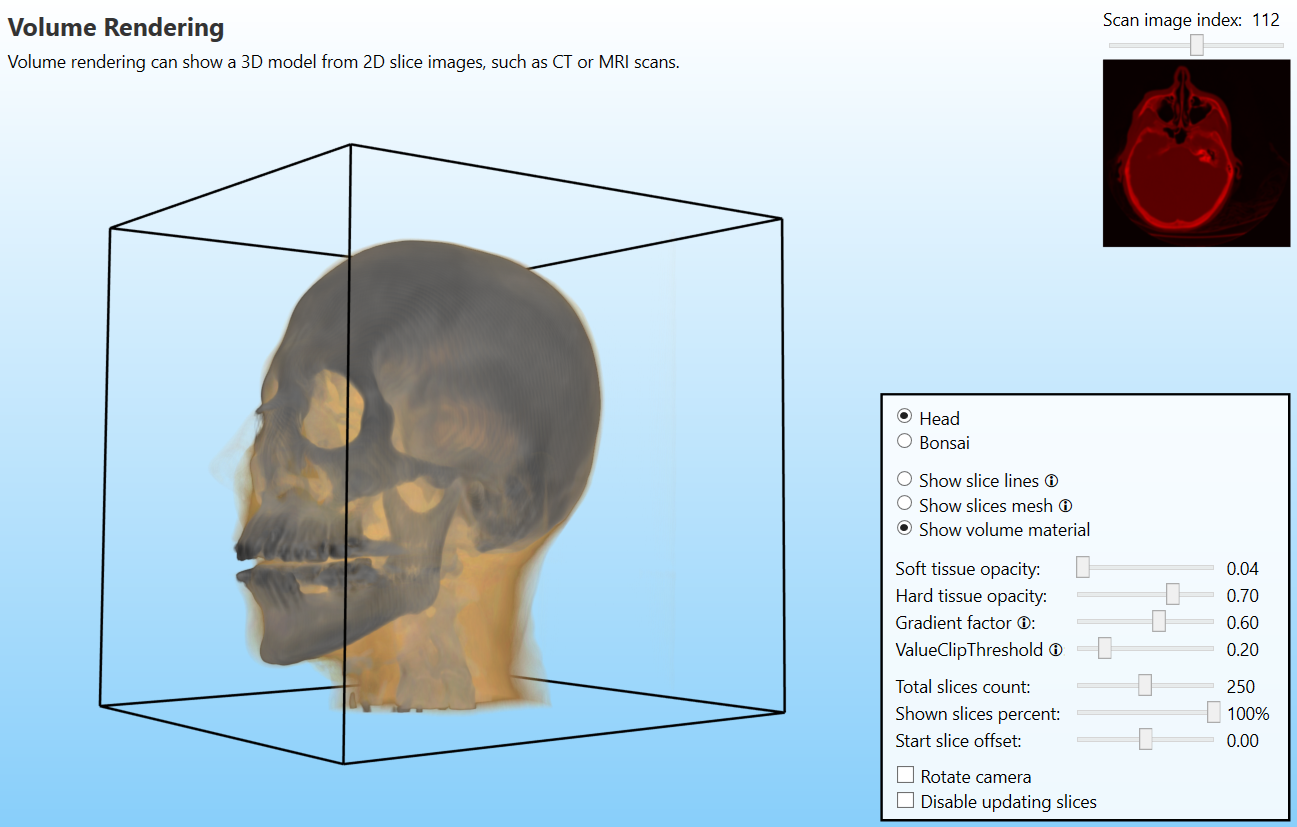
Volume rendering of 3D head model from MRI slices

The 3D model is rendered by using the new VolumeMaterialEffect that can show the 3D model from any camera angle, despite the slices being made from only one direction (one slice image is shown in the upper right corner of the screenshot). Based on the values from the scanned slices, it is possible to assign different colors and transparencies to different parts of the model - in this sample, this is used to distinguish between hard and soft tissue.

To show the 3D model, first, a 3D texture is generated from all of the scanned 2D images. Then the new CubeSlicer class is used to generate a mesh that slices a 3D cube from the camera's position to the other end of the 3D cube. Then this mesh is rendered by using the new VolumeMaterial that samples the value from the 3D texture (values from the scanned images) and converts the values into colors by using a transfer function texture (for each value in the scanned image, a color is assigned).

The sample can also be used to show how the 3D slices are generated. This can be best observed by yourself by starting the new sample and selecting "Show slice lines" or "Show slices mesh" options. You can also quickly see that by watching the following video.

The code from the sample can be used as a generic method for displaying 3D models from scanned 2D images. However, if you require any special settings or tweaks, please let me know, and I will try to adjust the code accordingly.

Another great new feature is support for super-fast hit-testing of complex meshes by using octree structures. This feature does not look that interesting, but it can be very useful for many of the users of the Ab4d.SharpEngine.

Usually, when performing hit testing, the engine generates a 3D ray from the mouse (or pointer) position to the 3D scene. Then the engine checks which SceneNodes may be intersected by the ray (by checking the bounding box). For those SceneNodes, the ray intersection is checked for each triangle of the SceneNode. When showing complex meshes with millions of triangles, this process can be very slow.

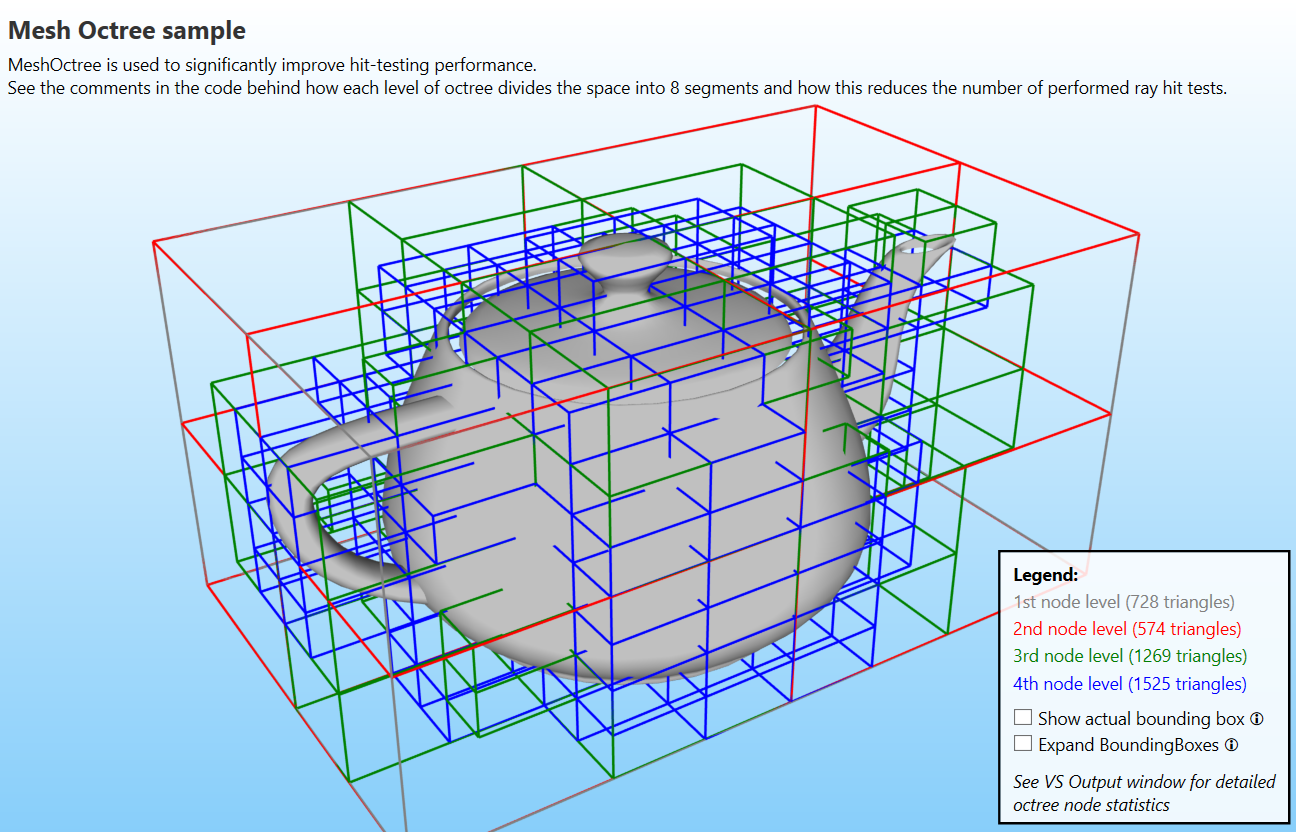
Octree structure helps solve that by organizing the triangles into a multi-level structure where each level divides the parent's 3D space into eight areas (or OctreeNode objects). The first level contains only one area, the second level contains eight areas, the third level 64 areas and the fourth level 512 areas (it is possible to define more than four levels; this is recommended for very complex meshes). Each of those areas has its own bounding box. So when doing hit testing, the area's bounding boxes are used to determine which areas are intersected by the ray. Then only the triangles in those areas are tested for intersection. This may reduce the number of checks by many thousands.

The following screenshot from the new sample shows how each level divides the space into 8 areas (see the bottom right corner to see how many triangles are in each of the levels)
The MeshOctree object can further optimize the distribution of the triangles by slightly expanding the areas so more triangles fall into lower areas. The following screenshot shows the distribution of triangles after that optimization (note that more triangles are distributed in the lower levels):
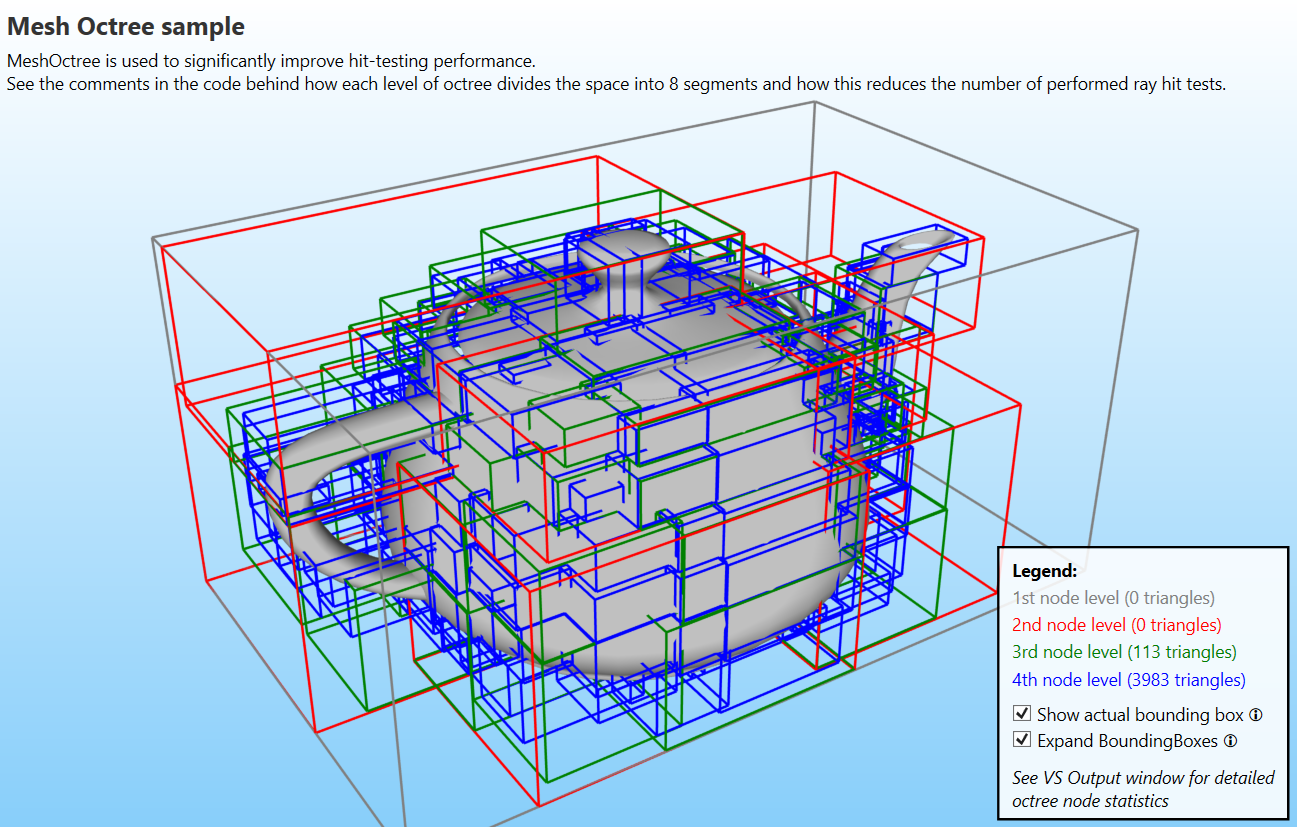
For example, the unoptimized image shows that the first level contains 728 triangles. Those triangles are always tested for intersection with the ray. But in the optimized versions, the first and the second levels have no triangles. To see the full distribution of triangles, the Octree sample prints the "Octree statistics" to the Visual Studio Output window. Here is a shortened part of that (the numbers in the list show how many triangles are in each area or OctreeNode):

Level 1: Triangles count: 0
Level 2: Triangles count: 0
Level 3: Triangles count: 113: 0, 0, 0, 0, 0, 7, 0, 0, ... (and other values)
Level 4: Triangles count: 3983: 4, 11, 52, 12, 8, 4, 12, ... (and other values)
Total triangles count: 4096

So, for example, if the ray intersects only the bounding box of the first area in the fourth level, then only 4 triangle-ray intersections are performed (11 intersection checks are done when only the second area is hit). Now, compared to 4096 checks that would need to be performed when no octree is used.

But using an octree is not free. For complex meshes, generating all the required OctreeNodes may take some time.

By default, the MeshOctree object is generated when hit-testing a mesh that has more than 512 positions. This is defined by the HitTestOptions.MeshPositionsCountForOctreeGeneration property. You can increase this value or set it to int.MaxValue to prevent automatic octree generation. If your SceneNode is not supposed to be hit-testable, you can also disable octree generation by setting the SceneNode.IsHitTestVisible property to false. You can also manually generate the octree by calling the CreateOctree method on the mesh object (do not forget to assign the created MeshOctree to the Octree property).

In the HitTestOptions class, there are also some other new properties that define the global settings for octree generation (for example, you can set the max level count and generate the octree at mesh initialization instead of hit-test time).

So, the octree structure can provide a huge hit-testing performance boost. However, if you do not need that and you experience a longer initialization time, you can disable the octree generation.

The last new feature that I wanted to mention was also developed for one of the customers and is also related to hit-testing. This customer is showing a mesh with millions of triangles and he needs to know which triangle is hit by the mouse. Usually, using OctTree would be perfect for that scenario, but he is changing the mesh (smoothing) on each frame. This means that on each frame, the MeshOctree needs to be regenerated. This was very slow and significantly impacted the frame rate.

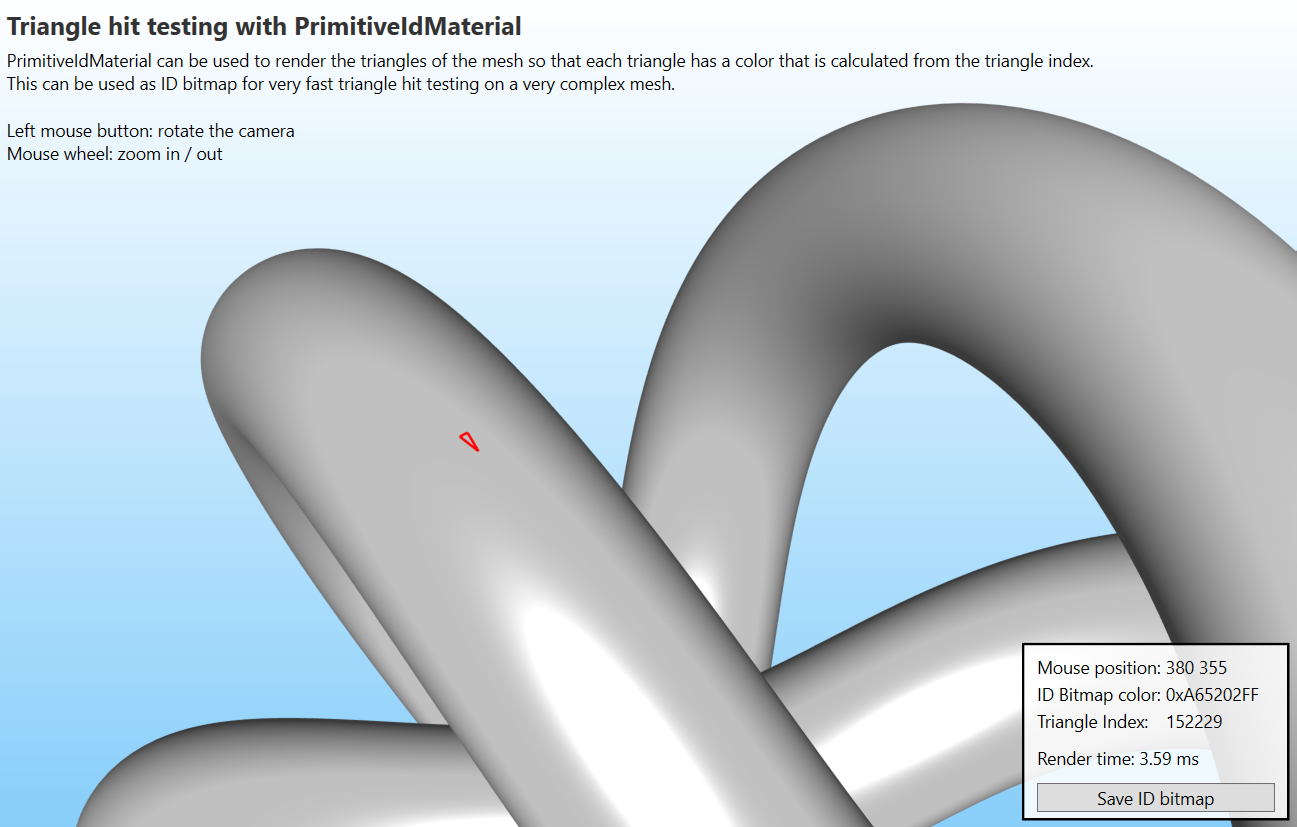
The solution was to render the scene to an ID bitmap where each triangle would get its own color. So instead of regenerating the MeshOctree, the frame only needs to be rendered again and then the index of the triangle can be determined by the pixel color under the mouse. This is much faster and allows the customer to perform real-time smoothing of the triangles under the mouse.

The following screenshot shows the new sample that demonstrates the triangle hit-testing that uses the ID bitmap (the mouse is not shown, but the triangle under the mouse is shown by a red polyline):
This version also brings some other new features. As always, to see the list of all the changes and fixes, check the Ab4d.SharpEngine change log.


I know that at this time of the year, many of you have already been expecting to be able to try the first version of Ab4d.SharpEngine for the web browser. But because of the issues in the core Ab43.SharpEngine library, and because some time was spent implementing the new features that are mentioned here, the web version is not yet ready for the first public version.

However, a lot of work was still done for the web version. Therefore, I am very happy to announce that today I have published the web page where you can check how the web version of the Ab4d.SharpEngine works. You can check it in the Ab4d.SharpEngine for web pre-alpha demo page.

Here is also a screenshot:
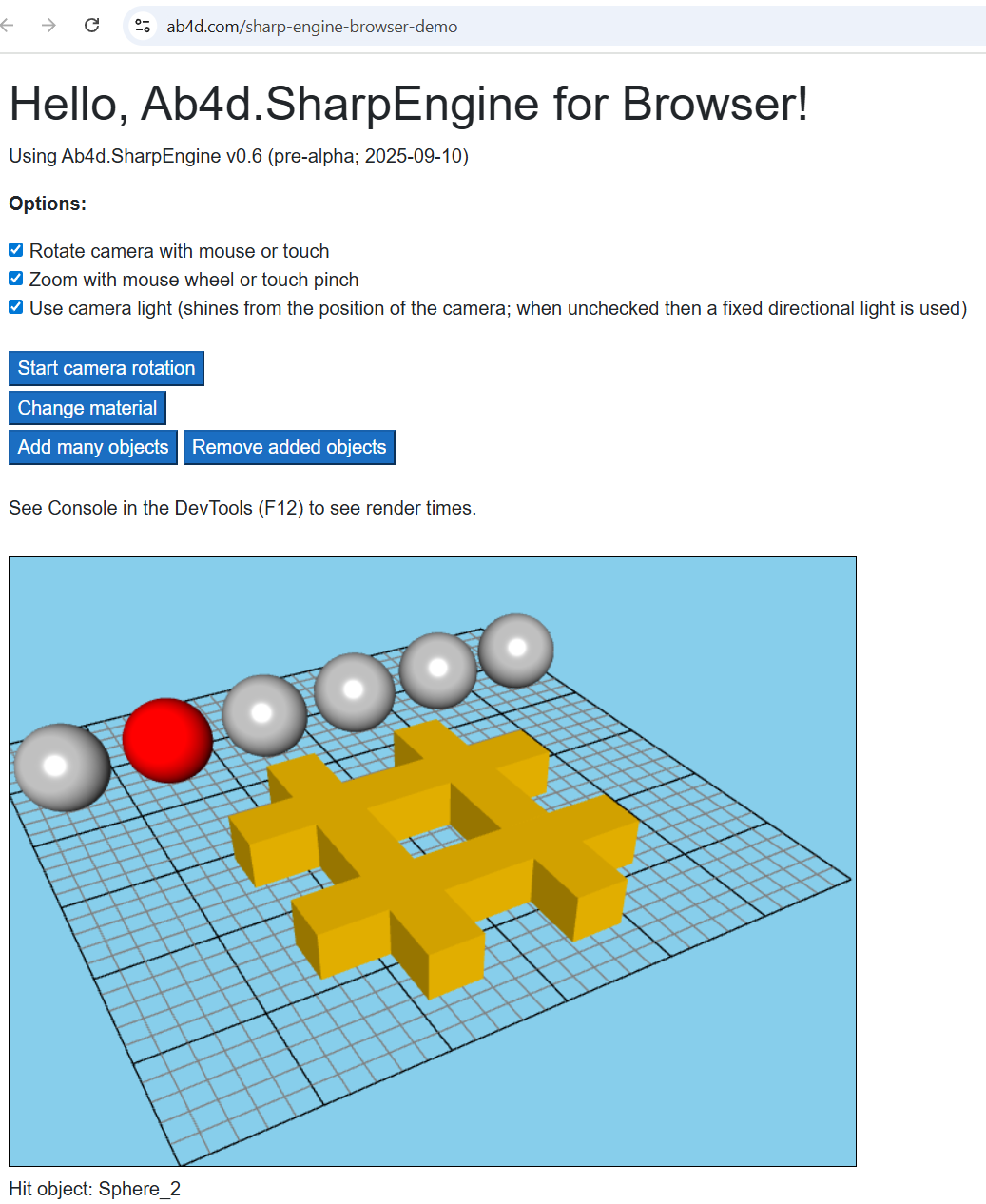
This demo shows that the engine already supports rendering meshes with standard material (with or without a specular effect). It also supports hit testing, rendering 3D lines and camera manipulation with mouse or touch (on mobile devices).

When the demo page is first opened, it takes a few seconds until the page is loaded (most time is spent downloading and compiling the self-contained .NET WASM file). But on subsequent page loads, the 3D scene is shown immediately.

You can also test how the engine works when rendering many SceneNodes. With each click on the "Add many objects" 1000 BoxModelNode objects are added to the scene. You can observe the rendering times by opening the DevTools (F12) and check the log messages in the Console tab. You will see that even though the engine is running in the browser, it can be very fast - on my computer, it is rendering more than 5000 objects in around 7 ms (rendering individual objects and not using mesh instancing).

As seen from this demo, many of the major features are already implemented. The code just needs a little bit of additional work. Also, documentation about the web project setup and a quick usage guide need to be written. I think that this can be completed before the end of this month. Then a new NuGet package and the source code for the sample project will be published. This will also allow you to test the engine with your own web projects.

Some of you were asking about the license of the new Ab4d.SharpEngine for the web. The good news is that there will continue to be only one license for desktop, mobile and web platforms. This means that the existing customer will be able to start using the new web version without any additional costs.